In the world of *MLB The Show 25*, sometimes the grass truly does seem greener elsewhere. Fortunately, San Diego Studio's baseball gem allows you the flexibility to seek new horizons in Road to the Show mode. Here's your guide on how to demand a trade in *MLB The Show 25* Road to the Show.
How To Get Traded in MLB The Show 25 Road to the Show
After wrapping up your high school career in *MLB The Show 25* Road to the Show, you face a crucial choice: pursue higher education to refine your skills, or dive straight into the pros with the team that drafted you. Whichever path you choose, you're not locked into one team forever. You can strategically plan your journey to the big leagues, knowing exactly what situation you're stepping into. Yet, the dynamic nature of professional sports means a change of scenery can often be refreshing.
In previous versions of Road to the Show, you could directly request a trade once you reached the majors. However, *MLB The Show 25* has changed the rules, and you can no longer ask to be traded outright. But don't worry—there's a clever workaround to expedite your move to a new team.
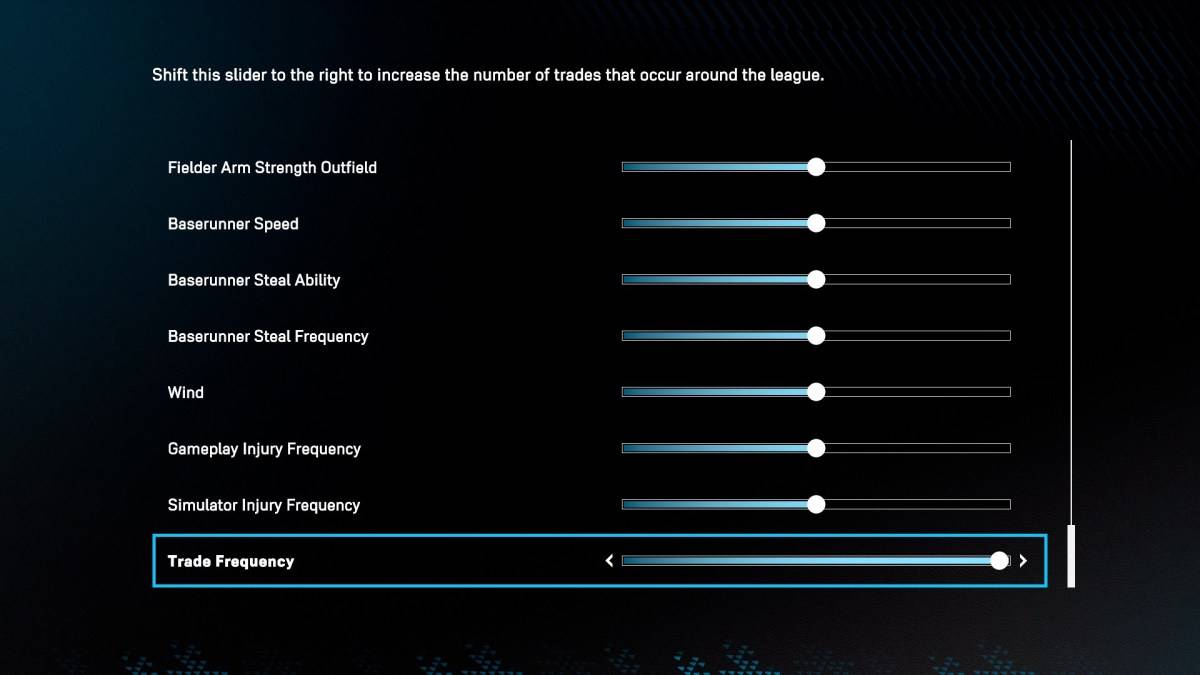
Navigate to the Sliders section in the Road to the Show settings, and you'll find an option labeled "Trade Frequency." This setting determines how often trades occur within the mode. Cranking this slider all the way to the right will increase the likelihood of player movement, including your own. However, don't expect instant results; other teams need to take notice of your performance first before they start calling about a potential trade.
Once your reputation starts generating buzz around the league, your agent will inform you, and trade offers will begin to come in. Take your time to evaluate your options carefully, as there's no assurance that teams will keep reaching out indefinitely. When you've settled on a destination that excites you, make the move. Upon arriving at your new team, consider sliding the Trade Frequency back down to minimize further trade requests.
And there you have it—that's how you can demand a trade in *MLB The Show 25* Road to the Show. If you're hungry for more tips, check out the best pitching settings to elevate your game in this new sports title.
*MLB The Show 25 is now available in Early Access on PlayStation 5 and Xbox Series X|S.*

 LATEST ARTICLES