Application Description
Utilizing Web Tools for Developers
Web Tools offers a comprehensive suite of features designed to streamline website management for developers. With integrated FTP, SFTP, SSH, and Telnet clients, HTTP monitoring, speed testing, code editing, and API debugging, administrators can efficiently connect and manage remote websites across multiple protocols. This powerful toolkit enables seamless access to server files, performance evaluation, and real-time troubleshooting—essential for maintaining high-performing, secure websites.
Benefits for Website Administrators
More than just a connectivity platform, Web Tools serves as a robust digital assistant for system administrators and developers. Below is a detailed overview of its key advantages:
Remote Website Activity Monitoring
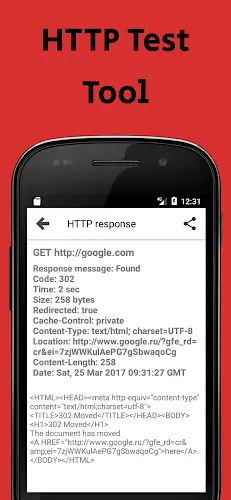
Technical Aspect: The app leverages standard web monitoring protocols like HTTP requests to continuously track website uptime, response time, and performance metrics.
Benefit: Real-time insights allow administrators to detect downtime or slowdowns instantly, enabling proactive maintenance and minimizing user impact.
Server Issue Resolution
Technical Aspect: Built-in diagnostic tools support secure connections via SSH, FTP, and Telnet, allowing direct access to server logs, configurations, and processes.
Benefit: Issues such as service failures, configuration errors, or permission problems can be diagnosed and resolved remotely, reducing dependency on physical access or desktop tools.
Website Performance Checking
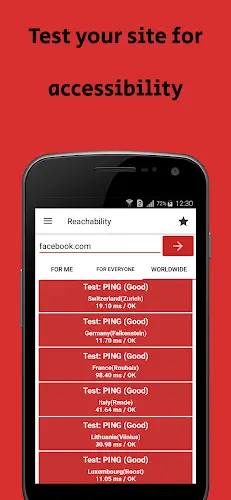
Technical Aspect: Performance evaluations are conducted through automated request testing, measuring load times, response latency, and server resource usage.
Benefit: Administrators can identify performance bottlenecks, optimize page speed, and ensure fast, reliable user experiences across different network conditions.
Code Editing and Debugging
Technical Aspect: The app includes a built-in code editor with syntax highlighting and debugging support for common web languages like HTML, CSS, JavaScript, and PHP.
Benefit: Developers can view, edit, and test code directly on remote servers, making quick fixes and improvements without switching between tools.
Enhanced Productivity
Technical Aspect: A streamlined interface, one-touch access to tools, and real-time data updates enhance workflow efficiency.
Benefit: Tasks that once required multiple software installations and complex setups can now be completed faster and more reliably from a single mobile application.
Prompt Issue Resolution
Technical Aspect: Real-time alerts and remote control features allow immediate response to errors, crashes, or security threats.
Benefit: Critical issues are addressed swiftly, reducing system downtime and ensuring continuous service availability.
Secure Communication
Technical Aspect: End-to-end encryption via protocols like SSH ensures data integrity and confidentiality during remote access.
Benefit: Sensitive operations such as configuration changes and file transfers are protected from interception, significantly improving overall system security.
Integration with APIs
Technical Aspect: Native API support allows seamless connection with external services including CDNs, database systems, and monitoring platforms.
Benefit: Automating routine tasks like backups, updates, and status checks increases efficiency and reduces manual effort across complex environments.
Differences Between Past and Present
Historically, website management was confined to desktop environments, relying on bulky software and limited mobility. Today, Web Tools breaks those barriers by enabling full-featured remote administration from Android devices. This shift marks a major leap in accessibility, empowering administrators to manage websites anytime and anywhere, without the need for a traditional computer.
Utility and Flexibility
Web Tools stands out for its versatility and adaptability. With just a smartphone, users can perform a wide range of tasks—including checking internet speed, uploading and downloading files, debugging scripts, and monitoring site health. Its modular design and intuitive navigation make it suitable for both beginners and experienced professionals, offering unmatched freedom and control over web operations.
Conclusion
Web Tools has transformed the way website administrators and developers manage online platforms. By combining remote access, advanced tools, and mobile flexibility, it delivers a powerful, all-in-one solution for modern web management. Whether troubleshooting, optimizing performance, or maintaining security, the app provides everything needed to keep websites running smoothly. In this guide, we provide the MOD APK version with Premium Unlocked features, available for free. Download it now and experience the full potential of remote website control.
Tools



 Download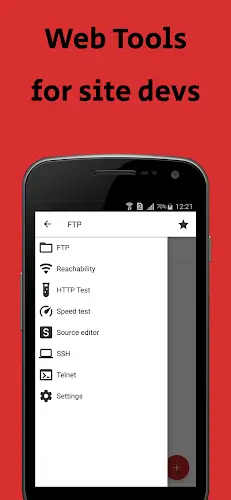

 Apps like Web Tools