In the past decade, the dream of seamless online play across different platforms has become a reality, unifying the *Call of Duty* community like never before. However, this feature, known as crossplay, comes with its own set of challenges. If you're diving into *Black Ops 6*, here’s a comprehensive guide on whether you should disable crossplay and how to do it effectively.
Should You Disable Crossplay in Black Ops 6? Answered
The decision to disable crossplay in *Black Ops 6* involves weighing its pros and cons. The primary motivation for turning off crossplay is to ensure a level playing field, particularly for console gamers on Xbox and PlayStation who wish to avoid competing against PC players. The reason? PC players use mouse and keyboard setups, which offer a precision in aiming that controllers can't match. Furthermore, PC players might have easier access to mods and cheats, despite *Call of Duty*'s robust Ricochet Anti-Cheat system. Players of *Black Ops 6* and *Warzone* have frequently reported encountering cheaters, so disabling crossplay could potentially decrease these unwanted encounters.
However, there's a significant downside to consider: by disabling crossplay, you're limiting your matchmaking pool. This can lead to longer wait times for matches and potentially poorer connection quality among players in the same lobby. From our experience, matches take noticeably longer to start when crossplay is turned off, and the overall gaming experience can be affected.
Related: Full Call of Duty: Black Ops 6 Zombies Walkthrough
How To Turn Off Crossplay in Black Ops 6
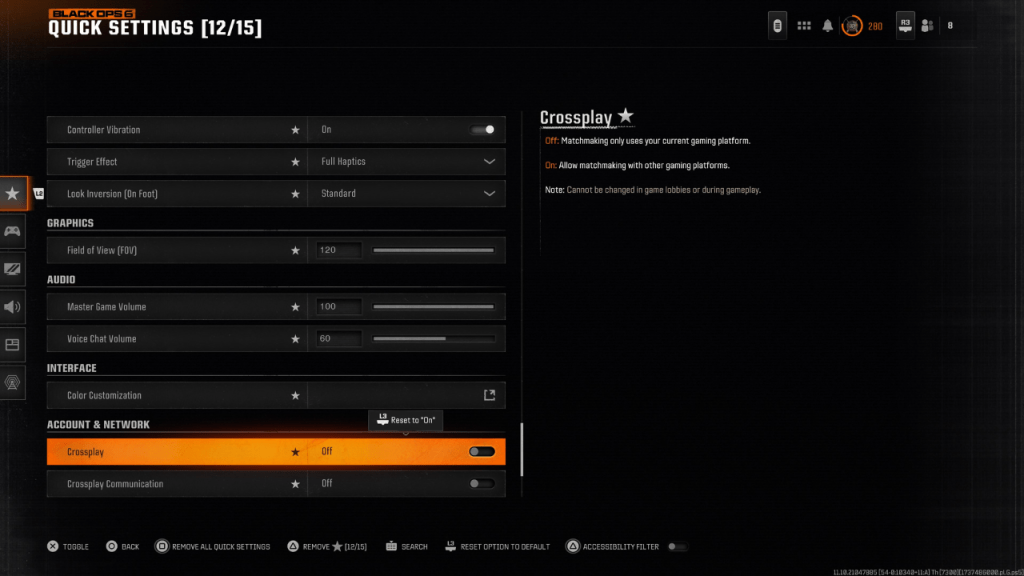 Disabling crossplay in *Black Ops 6* is a simple task. Navigate to the Account & Network settings, where you’ll find the Crossplay and Crossplay Communications toggles prominently displayed at the top. To turn off crossplay, just scroll to these options and press X or A to switch the setting from On to Off. You can do this directly within *Black Ops 6*, *Warzone*, or from the main *Call of Duty* HQ page. Note that in the screenshot above, we've accessed the crossplay setting by adding it to the Quick Settings for easy access.
Sometimes, you might find the crossplay option greyed out or locked, especially in modes like Ranked Play. This is because *Call of Duty* has historically enforced crossplay in certain scenarios to maintain fairness. However, starting from Season 2 of *Black Ops 6*, players will have the freedom to disable crossplay even in the game's most competitive modes, offering greater control over their gaming experience.
Call of Duty: Black Ops 6 is available now on PlayStation, Xbox, and PC.

 LATEST ARTICLES