Monitoring your Fortnite spending is crucial to avoid unexpected expenses. This guide outlines two methods to track your V-Buck purchases and their equivalent dollar value.
How to Check Your Fortnite Spending
Two methods exist for tracking your Fortnite spending: directly through your Epic Games account and via the Fortnite.gg website. Regularly checking your spending prevents financial surprises.
Why Track Spending? Even small, frequent purchases accumulate quickly. Consider the example of a player unknowingly spending nearly $800 on Candy Crush over three months, believing they'd only spent $50.
Method 1: Epic Games Store Account
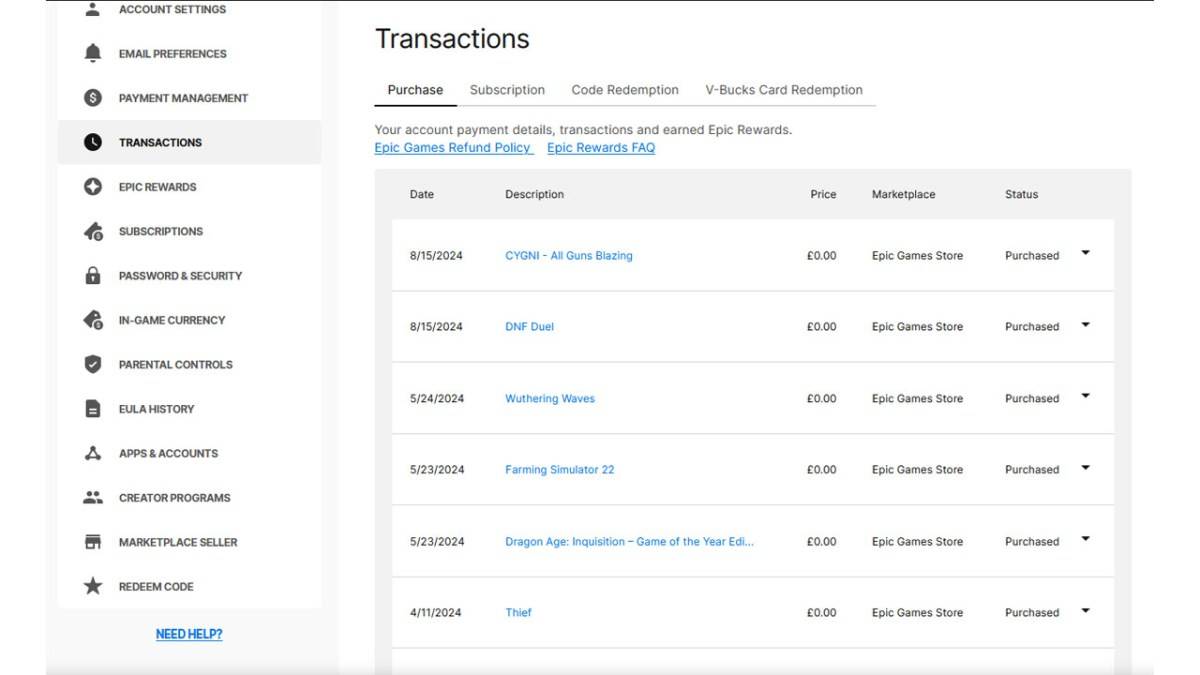
All V-Buck transactions, regardless of platform or payment method, are recorded in your Epic Games Store account. Follow these steps:
- Visit the Epic Games Store website and log in.
- Click your username (top right).
- Select "Account," then "Transactions."
- On the "Purchase" tab, scroll through transactions (click "Show More" as needed).
- Identify entries showing "5,000 V-Bucks" (and associated dollar amounts). Record both the V-Bucks and currency amounts for each purchase.
- Use a calculator to sum your total V-Bucks and total dollar amounts spent.
Important Notes: Free Epic Games Store games will also appear; scroll past these. V-Buck card redemptions might not display a dollar amount.
Method 2: Fortnite.gg
Fortnite.gg allows you to manually track your cosmetic purchases:
- Go to Fortnite.gg and log in (or create an account).
- Navigate to "My Locker."
- Manually add each outfit and item from your Cosmetics section (click the item, then "+ Locker"). You can also search for items.
- Your locker will display the total V-Buck value of your items. Use a V-Buck to dollar converter to estimate your total spending.
Neither method is perfect, but they provide effective ways to monitor your Fortnite expenditures.
Fortnite is available on various platforms, including Meta Quest 2 and 3.

 LATEST ARTICLES